|
MSP430
I have added another section
so to make it easy to find the topics until this gets split up, I have
added this contents...
NEW! SimpliciTI
Page
SimpliciTI using MSPGCC
The
USI I2C slave device
The MSP430 as
an I2C bit bang master
Setting the DCO with a
watch crystal oscillator
Soldering .5mm chips
March
25,
2009
The
USI
I2C
slave
device
This is the start of some of my MSP430
adventures. As the question of using the USI port as an I2C slave,
often on the popular MSP430f2012 and MSP430f2013, comes up...
I'll start here.
Now, I may have gone about this all wrong,
but it is my experience that the USI port has deficiencies where doing
I2C, as a slave, are concerned. I never looked at doing a master as a
bit bang version is short and sweet.
Here are links to the code that work for me:
I2C.h
I2C.c
Why this code...
1) There is a flag set for the I2C stop
condition but no interrupt is generated. So I check at every SDA rising
edge with a GPIO interrupt for the stop condition.
2) Acknowledge bits are done separately as
there are only 8 bits of USI shift register. An interrupt is generated
when the USICNT goes zero. But this happens when SCL goes high. If
there is a low sitting on SDA for the device ack and a 'USICTL0|=
USIOE' is done to do input on SDA for the next byte, there will be a
low to high on SDA while SCL is high. This is a start condition and
should not be done while the slave is inputting data from some master.
So I set up to check for falling edge on SCL in a GPIO interrupt before
setting SDA to input.
Since the last time I put this code up I
have enhanced it so 'this' slave device will look and feel much like an
EEPROM or Dallas I2C devices. 'This' device now receives a control byte
and a command byte before going into subsequent I/O.
Note:
The call 'unsigned char i2c_super_command(
)' needs to be defined somewhere in your code. It is called after a
valid control byte and any command byte is received. The command byte
will be in 'usi_command'.
At line 137 there is a LPM_EXIT
and this may
not suit your needs.
This is written for mspgcc and the likes of
interrupts will have to be changed for other compilers.
May
14,
2009
The MSP430 as an I2C bit bang master
Revised January 18, 2010
I have only used simple slave devices that do not sink the
SCL line so my older code drove this line without a pullup resistor. I
have changed the code linked below so that both SCL and SDA are driven
as open collectors. There is still no code to wait on a stretched SCL
but if you don't use devices that sink SCL, there is no good reason to
use it. Also, the delays are now set in the device header with the pin
assignments.
~~~
I don't see much of a point in using serial
hardware for an I2C master as a bit bang version is short and simple.
First is a generic library as SDA and SCL should be hidden at a higher
level. This should meet most of the I2C master needs for a straight 8
bit protocol:
I2C_master.h
I2C_master.c
Delete the reference to HE_util.h. There is
mspgcc code commented out in the header that would be referred to
'for loops are not a good way to create
delays, they can disappear with optimization. The actual delay could be
set with a more global define and depends on the clock speed/wire
length. I have a large delay here for a long I2C line.
Set the port and pins you will use in the
header.
Now you can write your specific code for
your device(s). Here is an example for reading 32 bytes of an EEPROM:
void ep_read_data( )
{
ep_ack= 0;
i2cm_start( );
if( ! i2cm_out( 0xa1 ) ) //control byte for this device
{
//input 32 bytes
i2cm_in( page_buf, 32 );
//bump counter for successive reads
ep_buf_pos+= 32;
}
else
ep_ack= 1;
i2cm_stop( );
}
There is also an example in the header for a
temperature device.
July 16,
2009
Setting the DCO with a watch crystal oscillator
There are several routines out there. If you
search 'Set_DCO' and 'SetDCO' in Google, you will find them. What may
not be obvious is that the routine will change according to the family
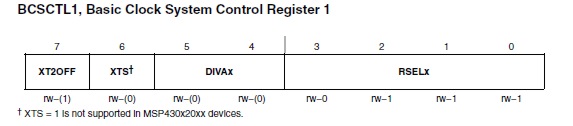
of devices you are using. If you look at x2xx basic
clock, you will find this:

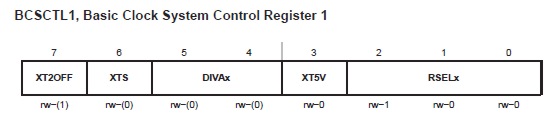
And if you look at x1xx
basic clock you will find this:
Toward the lower end of the Set_DCO routine
you will find the line:
cmp.b #0x87,&BCSCTL1
; Can RSEL.x be increased?
In some examples I've seen
the compare to
0x0f and 0x07. But XT2OFF is usually set to '1'. So neither of these
compares really work. It only seems to work because the routine usually
doesn't get there.
Here is a Set_DCO that I
have tested on the
x1xx family chip that should work for you:
Set_DCO.s
This is written for MSPGCC so you will need
to modify it according to your flavor of assembler. It is written to be
called from 'C' with the delta value and saves most of
the timer state on the stack.
JULY 17,
2009 (rev 8_30_9)
Soldering those half millimeter chips

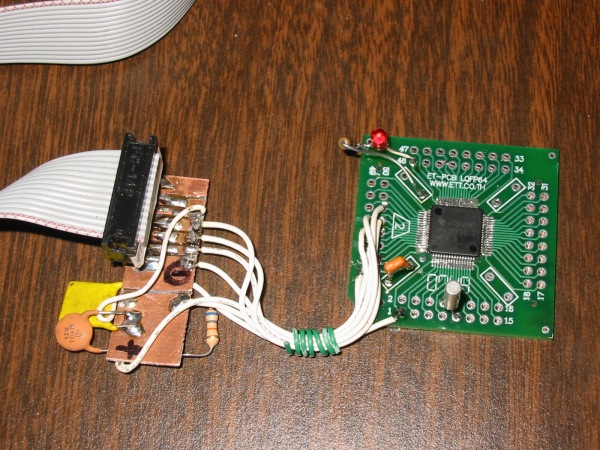
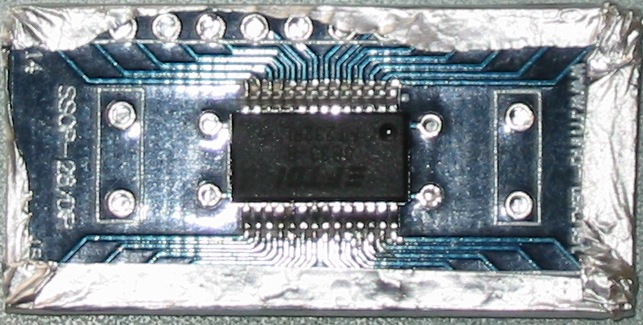
(MSP430F1612, JTAG, watch crystal and LED
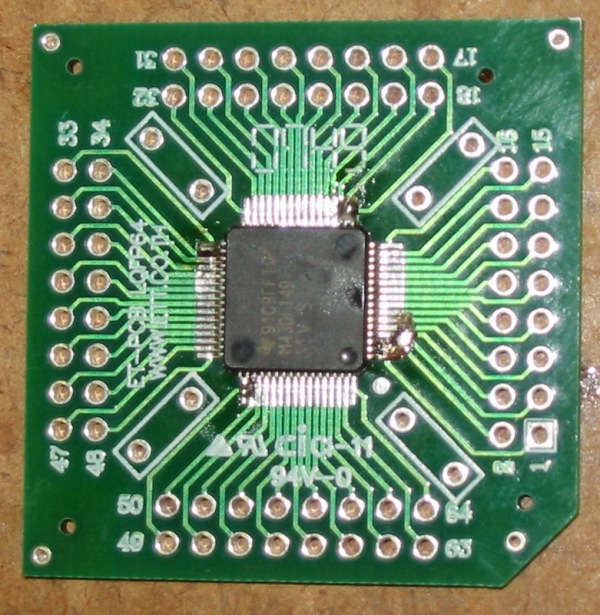
I got a pack of five of these boards on ebay from china. ~$10 in
the
door. I think the quality is fine, that makes the price right. This was
my first quad, second board. This is my first board:

(FT232RL)
I'll expanded on this entry as soon as
possible. But if I can make this
work, so can anyone. It only looks daunting if you have not been there.
(I say that from personal experience.) Both of the above chips are up
and running.
But to start with, you should not try
to deal with this job on a pin at
a time bases. That may work on a soic device if you are very diligent,
but half a mm?!, don't go there. What I found is that there was more
than enough tinning that you don't have to add any solder to your work.
In fact, you need to sop up what is already there. Other than a bottle
of flux and a decent soldering station, you really need an X10
microscope. (If you don't have old eyes like me, get one and keep from
getting old eyes!) At that, I don't think you should try this without
being able to see each pin as if it were a quarter inch in size, IMHO.
What worked for me was to flux the pins
and then use a piece of #22
finely stranded wire laid across the pins as a wick. Work your iron,
not too fast, down the row. You will see the solder wick into the #22
as you go. Again, take your time, you are soldering and need to get
that iron heat to your work. On the other hand, it is not like normal
soldering where you 'add' solder, that is the big difference.
Now, there may be instances where you
really do need to add solder, but
in the work I have done so far I have found that is a mistake. (Rework
would need new solder as too much gets wicked off? A new board and chip
seem to have plenty to start, something else.)
Before you solder, get that chip
aligned! If the pins are not
positioned right on, your chance of failure goes up exponentially. Of
course a quad chip is twice the work of an in line as you have two
dimensions to work on. You need to clamp the chip down, I did my first
ones with forceps and rubber bands. I'll be making a jigging device
before I do this again. I used a 4" Bausch and Lomb magnifying glass to
set but check with the microscope just to be sure. (twenty years ago I
may not have needed the magnifying glass!) BTW, I still have 20/20
three feet and out, but my arms are not that long :)
Just dab two of the opposite corner
pins with solder, don't worry about
bridging while checking your alignment. When you wick, the bridging
will disappear.
When you think the work is done, that
is where the microscope comes in.
You should see a nice flow from the pin to the board. Bridging will be
the challenge, on any pins you see a bridge, just do a little more
wicking. If you have moved across the pins with a solid wick and at a
reasonable speed, you should see what looks like machine soldering.
Don't be stingy with the flux, flux is your friend. When you pass
inspection it will all wash off with small dose of flux remover,
then soap and water.
Find yourself a hand full of chips and
boards at a reasonable price and
try your hand at it. You may find, as I did, you will have a working
device soldered down the first time out. If you do, you will have no
trouble thinking you can do it anytime you need from then on.
I'll take more pictures and talk more
when I go there. But after a couple of chips that work when I got done,
I would not call this rocket science. Search on youtube, you will find
several different philosophies on soldering fine pitch chips. They just
make it looks so easy!
Professional SMT
Soldering - Washburn Computer Group
OCTOBER 1,
2009
Soldering, One more Time
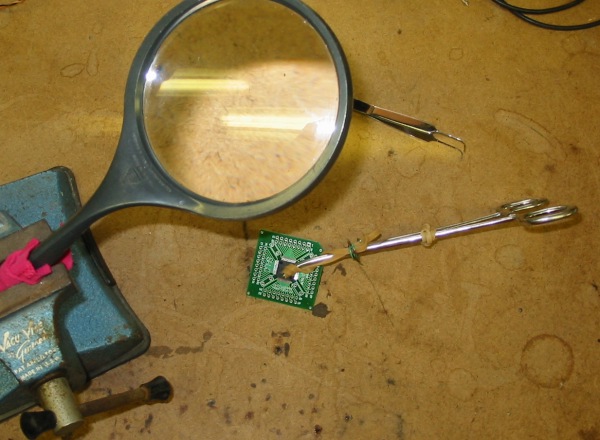
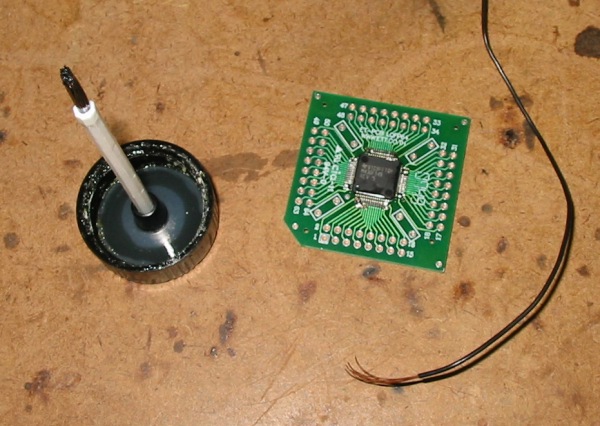
Here I've taken
some photos of my third chip. This went very quickly now that I am more
comfortable with this. I'd say start to washing the flux off, this is
less than a ten minute job. It is about being comfortable with what you
are doing. A little practice will get you there fast.

Before picking up
the forceps get that chip aligned under your magnifying glass. Hold the
alignment on one side of the chip with your finger then put the clamp
on. There are two rubber bands on the clamp. One to the right for a
light clamping pressure. The one on the left is just a couple of wraps
on the tip and the rest is held out of the way with a piece of wire.
This puts pressure from the tip on the center of the chip where the
metal part of the clamp would land on the edge of the chip. Now you can
pick it up by the forceps and take a good look at your alignment. Yes,
a hands free magnifying glass is necessary.

When you are
satisfied with the alignment put a drop of solder on the four corners
and then you can take the clamp off. To make sure the chip stays seated
down I've added four more dabs of solder. You can see that here.

Now it is time to
solder it down. Be liberal with that flux. I didn't use anything fancy,
just some off the shelf GC liquid flux. You need the flux because you
will not be adding solder but instead, removing it. That piece of
stranded is #22. I like it better than wick because it is not so
intrusive. Just lay the wire along the pins and gently work your iron
down the row on top of the wire. You will see lots of solder wick into
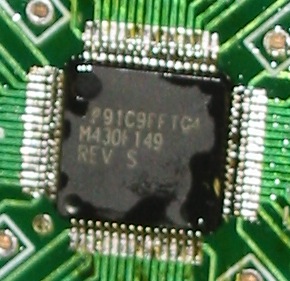
the wire. sop up as much as you can and take a look under a microscope.
If you see any bridging do a little more wicking. When you are
satisfied, finish up by touching your iron down the pads and you will
have a very professional looking job. You will see an example of
'touching' in the Washburn video. It should look like production work
under the microscope.

Here it is
before washing the flux off.

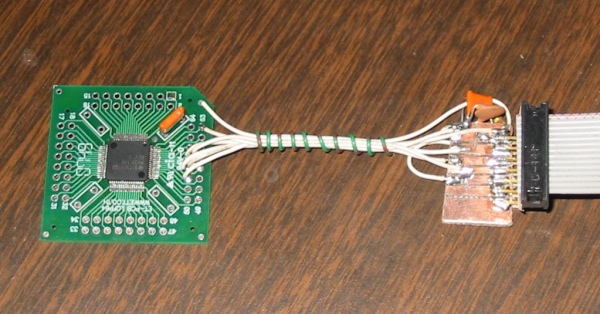
The JTAG test,
works fine!
Thanks, Dan.
Copyright © 1996 - 2009, Highlands Electronics All Rights Reserved.
Page created: 25 mar 09 rev: 3 feb 10
http://www.lakeweb.net/MSP430/index.html
|